Upgrade to Alephino release 5.0
The setup program has already copied the files listed below from
the currently operated Alephino environment, provided you've choosen an
"Update-Installation":
Directory etc :
alephino.lic
alephino.usr
Directory data/photo : *.* (all files)
Upgrading the Alephino server from release 3.0
As as result of an update installation the following files have been added by setup procedure:
a) in Alephino 3.0 server environment :
etc/unload.cmd
etc/exec_unload.cmd
bin/unload.sh (for Unix/Linux version)
bin/unload.bat (for Windows version)
b) im Alephino 5.0 server environment :
etc/upgrade.cmd
etc/exec_upgrade.cmd
etc/statshift.txt
bin/upgrade.sh (for Unix/Linux version)
bin/upgrade.bat (for Windows version)
The server installation directories for both the source- (Alephino 3.0) and also target version (Alephino 5.0)
have got an additional sublist upgrade.
This serves for temporary storage for files that will occur while performing the upgrade.
The upgrade process bases on a complete unload (export) and load (import) of data that must be carried out for each database.
In the process:
- all characters will be translated from Latin-1 to Unicode resp. UTF-8,
- all indexes and link lists inside of the data pool will be rebuilt,
- all sequence numbers will be rebuilt,
- all statistics data will be processed for compatibility reasons since Alephino 5.0 counts addditions and separations per month.
When developing the upgrade procedure, our main goal was an easy handling.
Before starting the procedure described below please note:
-
If the Alephino Release 3.0 server is configured as Windows service,
this service must be stopped and removed from services list.
This also applies to Alephino 4.x services - if already installed.
-
The procedure is prepared to handle the Alephino
standard database, i.e. the one with the symbol M resp.
file name DDMARC.
-
If you have deleted the standard user SYS or have modified his password,
please edit the following files according to the modifications you've made:
a) unload.cmd in Alephino Release 3.0, subdirectory etc
b) upgrade.cmd in Alephino Release 5.0, subdirectory etc
In the first command line you'll find login USER=SYS PASS=SYS;
this line must be adjusted.
- If you have made significant changes in the definition files
compared to the Alephino 3.0 standard, you must manually make the same
modifications in the Alephino 5.0 definition files before starting the
upgrade procedure (otherwise, in the worst case, data might get lost!).
Important are modifications like:
a) Additional master files and/or additional tags in existing master files
(file etc/marcdata.int).
b) Additional databases
(files etc/alephino.cfg, etc/marcdata.int, etc/marcfile.ext)
c) Modifications concerning linkage between Alephino records.
Of special importance in this regard is subfield linkage mode "SUB=Y".
(file etc/marclink.int)
d) Additional index files
(files etc/marcindex.int)
-
If you have defined some additional databases, the upgrade procedure has to be performed
separately for each of them. Before that, just do the following steps in order to prepare the following upgrade files:
a) unload.cmd in Alephino Release 3.0, subdirectory etc
b) upgrade.cmd in Alephino Release 5.0, subdirectory etc
In these two files, the standard database must be replaced with your additional database, t.m. each occurrence of pool= must be adjusted.
-
Please note: Your Alephino 3.0 databases may contain special characters
represented by so called protypes (leading Backslash followed by 3 digits).
Only those characters that meet the MAB characters set will be dealt with
resp. translated successfully into UTF-8.
-
If all databases have been converted successfully, subdirectory upgrade is not needed
anymore and can be deleted.
The upgrade procedure step by step:
- Change into directory bin of your Alephino Release 3.0 server, e.g.
C:\Program files\Exlibris\MarcServ_30\bin.
-
Start unload.bat (Windows version).
Customers who use Unix/Linux have to call up ./unload.sh instead.
-
Change into directory bin of the Alephino Release 5.0 server, e.g.
C:\Program files\Exlibris\AlephinoServer_50\bin.
-
Start upgrade.bat (Windows version).
Unix/Linux users have to call up ./upgrade.sh instead.
Please note that during the upgrade more than the double amount
of disk space is needed compared to "normal operation".
Also, the unload and load procedure have been optimized in terms of runtime
compared to the conventional Alephino export and import routines, still
it will take some time.
For example: A database of an average size (20.000 bibliographic records)
will be converted on a PC with Intel Celeron prozessor, 2.6 GHz clock rate,
1 GByte memory and WindowsXP installed in about 5:00 minutes.
- If no errors have occured, make sure that the Upgrade was
completed successfully by inspecting the log entries via the Web
Administration after first start of the Alephino Release 5.0 server.
- Afterwards - and before you start your regular work with the new
Alephino version - don't forget to create an Alephino database backup
using the Web Admistration. Also, delete all existing log files for the
database in subdirectory pools, i.e. files
with the ending .log and additional endings .YYMMDD, e.g. DDMARC.log*.
Upgrading the Alephino server from release 4.x
Data pools from release 4.x will be copied automatically:
Directory pools : DD???? (all file names with six characters beginning with "DD".)
Please note:
- Caused by a bugfix in combination with invoice number indexing a database copied from version 4.x
cannot be handled properly in version 5.0.
Hence it is necessary to prepare the database(s) by performing the following steps:
-
Before upgrade delete indexfile no. 833 in version 4.x using the service module:
Administration->Delete File(s)
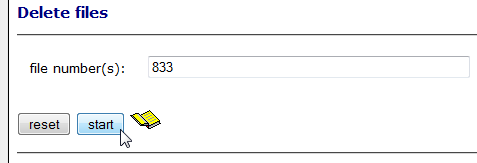
If you miss that step you'll see error message "Deviating file definition" (Error -237) that prevents Alephino 5.0 from working!
-
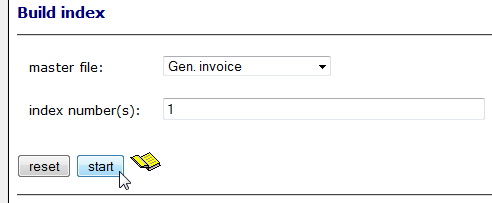
After upgrade create index on invoice numbers in version 5.0 using the service module:
Administration->Create Index
- Databases originated by release 4.x are fully compatible to release 5.0 provided that the set of control tables
has not been modified by the customer. Therefore all files matching the naming convention DD???? will simply
be copied from the currently operated Alephino release 4.x server.
- The compatibility issue mentioned above does not apply as soon as additional databases have been introduced and/or
internal file definitons have been customized. This concerns the files etc/alephino.cfg as well as etc/mabdata.int
(MAB2 standard) and etc/marcdata.int (MARC21 standard) respectively.
Such customizations have necessarily to be adapted for release 5.0 before start using copied databases.
Otherwise error messages like "Deviating file definition" (Error -237) will appear.
-
Please perform a regular Alephino data backup for each database defined in your Alephino system before start using it
after having finished the upgrade.
-
Alephino 4.1 offers the opportunity to maintain a digital repository. The sub-directory data/objects (or another representing the root of
that repository) will not be handled by the upgrade procedure.
If you have used the functionality pls. make a copy of the object data into the respective directory of Alephino 5.0.