Installation of APACHE http-server for Windows

For the operation of Web based services for system administration as well as the Web OPAC Alephino needs an http server (subsequently called Web server). Our recommendation is to use "APACHE" server because: In order to automatically add the necessary adjustments to the http server configuration by the Alephino installation routines, it is necessary to install Apache first. For this you may use the latest installation packages available from Apache Software Foundation. Alternatively you may use the Apache installation package available via our Alephino download site. Alephino is compatible with Apache from version 1.3.
If you want to integrate the Alephino services into Microsoft Internet Information Server (IIS), please ignore this chapter and follow the specific installation instructions for IIS.


Installation of the http Server for Unix/Linux

In Unix environments we assume that there already is an http server APACHE.

The Alephino server setup provides an Apache configuration with the file vhost.alephino; all you have to do is to integrate the Alephino services into the Apache main configuration file httpd.conf by simply adding the directive
Include [alephino-path]/vhost.alephino
at the end of the file.

Browser-based Alephino services will normally inherit the access rights of the http server. Configure Apache using the directives User and Group in such a way that: Security aspects will be discussed in chapter Administration via Web


Configuration of Alephino 5.0 for Microsoft Internet Information Server (IIS) from version 5 and higher

Preliminary remarks

Browser-based Alephino clients must be installed as port-based virtual servers, in Microsoft terminology called sites. This procedure is promoted by the IIS only in combination with a server license. IIS without an explicit server license only permits the generation of subdirectories under the -predefined- standard site.

1) Setup of virtual sites in Internet Service Manager


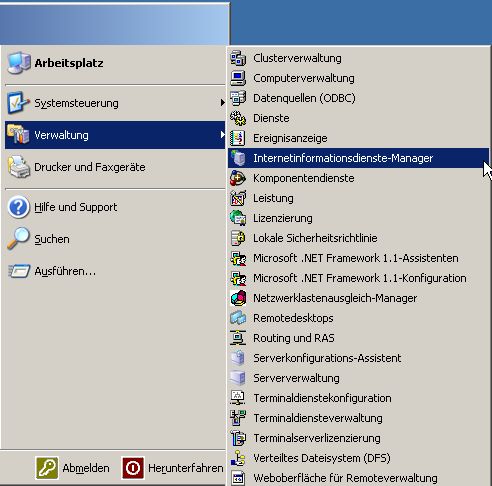
You'll find this program in the start menu under Administrative Tools (Windows2003 Server).


Please proceed as follows:
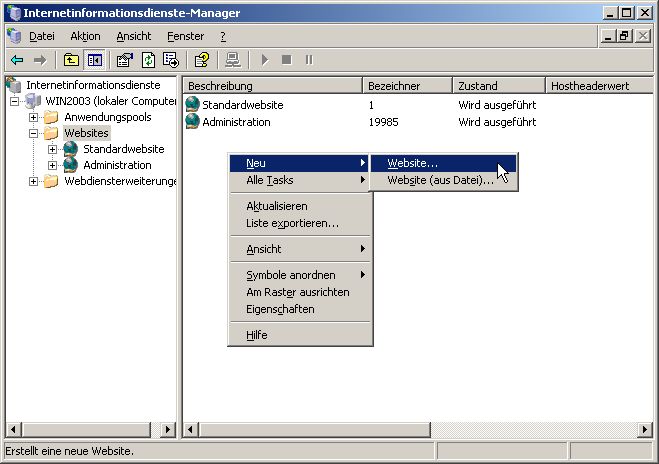
First, mark "Web sites". With a click on the right mouse button the context menu is displayed. Choose "New", then "Website".


Notes:
Setup sites with the following properties:

Name
Port
(TCP connection)
Base directory
(local path)
Permissions
Alephino 5.0 Administration
8040
<AlephinoRoot>\bin
Execute (ISAPI-Applications or CGI)
Alephino 5.0 OPAC
8070
<AlephinoRoot>\bin
Execute (ISAPI-Applications or CGI)


1.1) Setup of virtual directories


Below the sites you have to setup the following virtual directories:

Alias name
Local path
Permissions
For site "Web-Administration, depending on communication languages... "
english
<AlephinoRoot>\htdoc\aliadm_eng
Read
german
<AlephinoRoot>\htdoc\aliadm_ger
Read
portugues
<AlephinoRoot>\htdoc\aliadm_por
Read
espanol
<AlephinoRoot>\htdoc\aliadm_spa
Read
For site "Web-OPAC"
download
<AlephinoRoot>\temp
Read
pix
<AlephinoRoot>\htdoc
Read
repository
<AlephinoRoot>\data\objects
Read


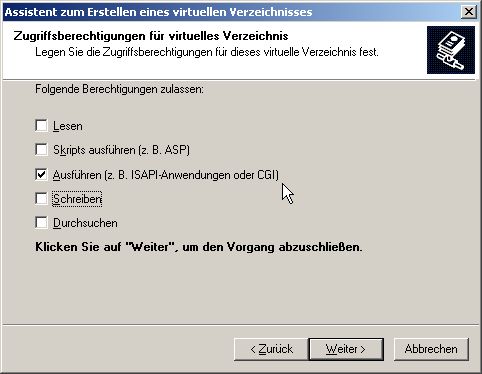
Using the "Wizard for setting up virtual directories" adjust the Permission to base directory for the Web OPAC as well as the Web Administration as follows:


1.2) Note for customers who use IIS version 6.0 (Windows Server 2003)


With IIS 6.0 a lot of additional configuration options have been introduced. Most of them with special regard to security gaps. In connection with Alephino, the following option is of interest:

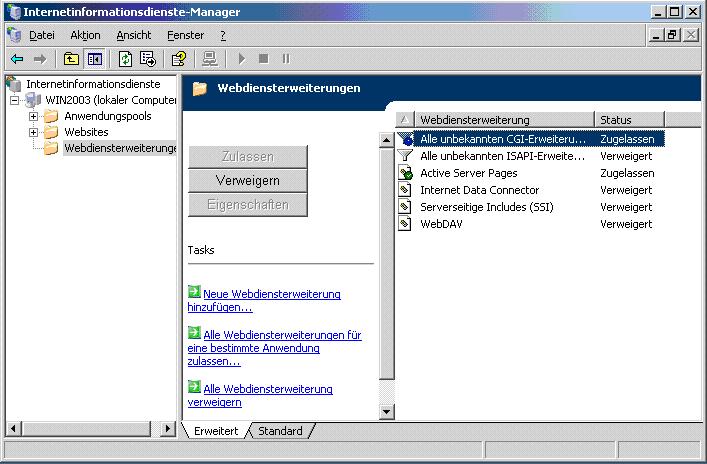
"Traditional" CGI-programs cannot be executed with IIS 6.0 in its initial state. But Alephino works with executable programs (extension .exe) for its Web services. To enable them being considered, use the configuration dialogue shown below. The respective category is named "All unknown CGI-extensions":

Web service extensions


1.3) Permissions for Alephino Web services on file system level


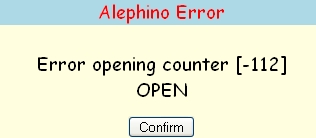
Web services need write permissions to Alephino subdirectories temp and data. A lack of these permissions will typically cause an error message like this:


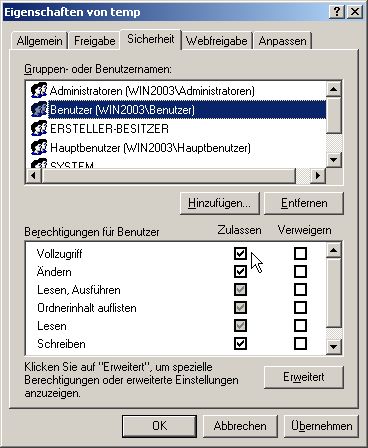
Solution: At least the user under whose ownership the website is running (e.g. IUSR_WIN2003) must have "Full access" to the directories mentioned above.